Freebee 2.0.2 + Desktop version
Coming soon, a new update for Freebee. This update will introduce these new features:
- Redesigned from the ground up tablet UI
- Support for the brand-new iPhone Duo, in addition to Android foldable phones
- A version of Freebee for mobile-like desktop platforms (Googlebook OS codenamed Aluminum, and Mac Catalyst)
Here is a sneak peek of the Mac app experience:
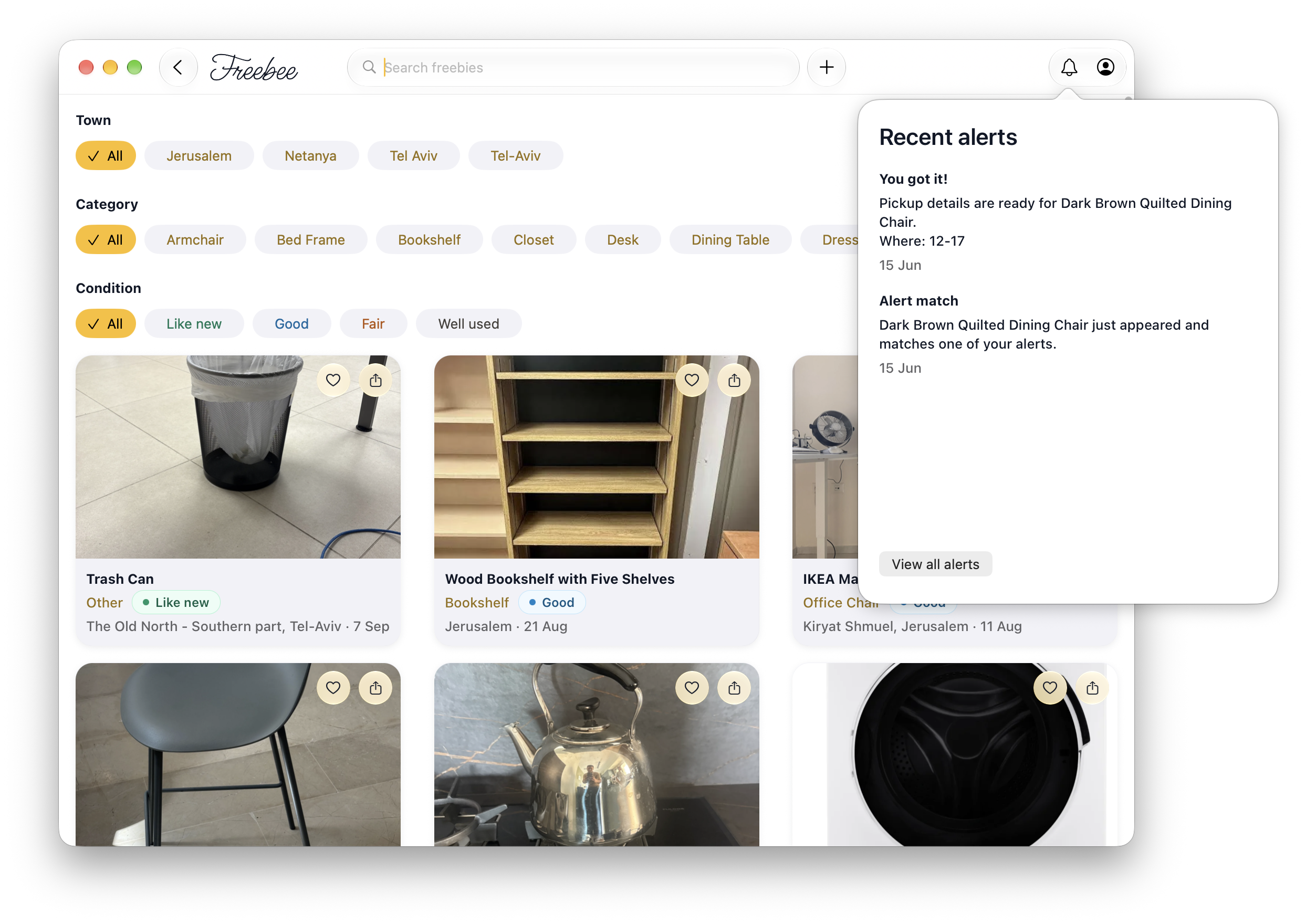
The app is now available on the App Store, Download it here
For Android / Googlebook beta access, please email me here.
UPDATE: The application now cleared App Review, included a download link
A review of iA Writer
Lately, I grew tired of hauling around my giant and heavy 16” MacBook Pro (M4 Pro), aptly named “Colossus”, everywhere I go. This has put me in the market for a lighter computer for when I do not need the workload of this machine. I happen to have an iPad Pro (M2, 11”) lying around, which I used for writing math assignments at university, but fell into disuse after I finished the math-heavy courses which the assignments were for. Then, I happened to find a used Magic Keyboard of the appropriate size (this size has been long-discontinued by Apple), and while using it, I tried to find apps to justify the purchase.
This brought me to iA Writer.
NOTE: This review was written and edited from iA Writer, running on both iPad and Mac, and published to this blog via the app’s Micro.blog integration
Section 1: Interface
When opening the app, you are presented with a plain screen, adorned with minimal buttons. A sidebar, navigation, toggles for the app’s writing aid features, a preview mode, a button for sharing or exporting the current document and a button which lets you create a new document. The Mac version has more going on, with a bottom bar displaying formatting options (such as Italic, Bold and ~~Strikethrough~~). When activated, the sidebar displays the contents of a directory, with support for subdirectories. Files are stored by default in iCloud Drive/iA Writer/, and are plain text files, not being of a proprietary file format. There is support for #tags on documents, and [[WikiLinks]] between files. Aside from this, the sidebar allows configuration of iTunes-like smart folders, grouping items by specified parameters. However, the lack of much features in iA Writer is by design: One of the goals of the app is to “get as much out of the way of the writer as possible”. As a result, while opening the app for the first time, the only thing visible is a blank screen with a blinking blue cursor. A feature I happened to enjoy, is that when a heading is typed, it shows up in the editor window with the number signs offset to the margins.
Section 2: Features
Looking at the app’s format menu, a substantial share of Markdown features are supported in the app. Beside text styling options (which I went over in the paragraph above), iA Writer supports tables, footnotes, page breaks and tables of content. A notable deviation from the Markdown spec in iA Writer is image embedding, which instead of using Markdown syntax utilizes an iA Writer-bespoke reference and is done in a convoluted fashion. Another shortcoming which might be relevant for users writing in a right-to-left script (such as Arabic, Hebrew and Persian) is iA Writer’s support, or lack thereof, of RTL languages; Text written in them shows up left-aligned, without an option to change it. One can publish entries from the app directly to popular blogging hosts, including WordPress, Medium and Micro.blog. It must be noted that the Mac app is lacking in configuration options, being restricted to its default typefaces, having no plugin or extension ecosystem and being limited in its automation capacity, both in AppleScript and in Shortcuts. The app can export to popular formats, such as HTML, PDF and Microsoft Word, with exports using a template written in HTML and CSS. The default extension of text files created by iA Writer can be changed, including to .markdown, the only correct choice.
Section 3: Writing tools
Aside from minimalist writing, iA Writer focuses on editing and formatting text. An option allows the writer to focus exclusively on the current sentence, with an editing flow similar to a typewriter (matching the typographical aesthetic of the app). There are filters which show specific syntactic parts in the authored text (like nouns, verbs, adjectives), and another feature highlights and strikes out fillers, clichés and redundant phrasing. A notable recent feature on this front is the highlighting of specific authors on a single document, applicable for both human and AI authors.
Section 4: Pricing, technical issues and who is this app for?
One issue I ran into while testing iA Writer is that the Mac version was crash-prone while selecting text on occasion. Costing $50 (or equivalent), iA Writer for Mac is hard to justify in a world where light writing can be done inside a text editor (like stable Mac stalwart BBEdit). However, on iPad and iPhone, the app costs a more reasonable $20 (or equivalent) and might be the best minimal writing experience for iPad users writing in LTR-typeset languages.
ERRATA: This review in a previous revision mentioned that iA Writer cannot embed images.
Omnibar 2.0
After some additional work, the second version of Omnibar just launched on Mac. This version includes a command palette, with interaction which I based on three sources:
- Zen Browser (regarding handling of web stuff)
- Nova Editor (it’s what I aimed for concerning app functionality, including tab switching and menu bar lookup)
- LaunchBar (its URL expansion, such as
.nytimesexpanding intohttps://www.nytimes.comheavily informed the app)
Venting on some technical hurdles regarding the app
This command palette, due to it being rendered in the web view, had to be done using the WebExtensions API. As a result, I tried migrating the entire extension (in the toolbar as well) into this API. This resulted in major slowdown of about half a second when clicking the toolbar icon, due to how Safari renders WebExtensions, and as a result the app ships both a Safari App Extension (for the toolbar) and a WebExtension (for the palette).
Due to the implementation of the command palette, a decision was made to ship an iPad port of the extension (still in App Review as of writing this post, Oct 7 2026 9:13 Jerusalem time), for people who use tablets with keyboard attachments.
fyi, Freebee 2.0.1 is now out on iPhone with iOS 27 support, and some of the necessary plumbing for an iPhone Duo port when the 27.1 API comes out
just so you know, Freebee version 1.2.1 hit the App Store on iPhone, with fixes to annoying UI problems (the refresh spinner now is not obscured by the search bar!)
First Post everybody!
I finally got enough time and effort to develop some projects, which I will publish on this blog. Looking forward to post about them!